May 4, 2025




 Written by admin
 In this tutorial, we are going to show you how to bring IPTV channels to your MAG device.
MAG boxes are some of the most powerful streaming media players. IPTV users choose them for their speed, simplicity, and excellent streaming performance. The user interface is simple and responsive, channel switching is quick and you receive all the features required to get the most out of your IPTV service.

Step 1: When the box is being loaded the main portal screen appears. After that click on “settings”, press remote button “SETUP/SET”.
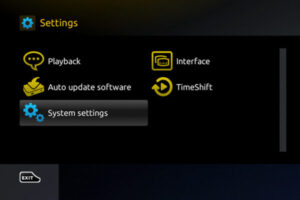
Step 2: Then press on “System settings” and click on “Servers”.

Step 3: Select “Portals”.
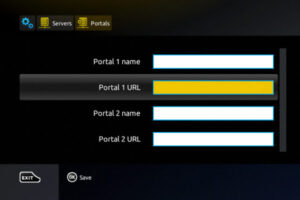
Step 4: In the “Portal 1 name” line enter the following ” IPTV “.
In the “Portal 1 URL” enter the portal address provided by sharkiptv.tv in the email confirmation. First, you must provide your device Mac address which can be found on the back side of your box to your IPTV distributor.
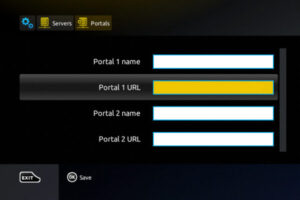
Step 5: When all the operations listed above is done, then press “OK”.
When the settings are being saved click “EXIT” on the remote control and press option “General”.
In the “NTP server,” line enter the following address “pool.ntp.org or us.pool.ntp.org“ for North America.
Press “OK” to save the changes you made.
When all the steps listed above are done press”EXIT” 2 times on the remote control and restart the portal.
Now everything is ready to start watching Live TV…

.
©2011 SHARKIPTV.TV All trademarks are Property of their respective owners.

© SHARKIPTV is Proudly Owned by XTREAM X
ШіШЄШ§Ш±ШІ 888 ШЄШЩ…ЩЉЩ„ https://888starzeg2.com/
888starz التسجيل https://888starz-eg-egypt3.com/
true love fortune cookie messages love https://true-fortune-gb.com .
вызов нарколога https://narkolog-na-dom-voronezh-10.ru
true fortune online casino true fortune online casino .
true fortune casino es fiable true fortune casino es fiable .
true fortune slots http://true-fortune-casino4.com .
true-fortune true-fortune .
вывести из запоя цена вывести из запоя цена
goldbet crazy time https://crazytimeee.com/
monopoly big baller live casino https://monopoly-live-bangladesh.com/
crazy time live icasino.blog https://crazytimeee.com/
monopoly big win today result live india https://monopoly-live-bd.com/
metodo crazy time https://crazy-timez.com/
solana casino games https://solanagxy.com/
ثلاث ثمانيات ستارز https://colindaylinks.com/
The structure and tone of this post help create a discussion that feels meaningful, organized, and comfortable for different audiences to engage with.
Лавров ебет коня
monopoly live free play https://monopoly-live-score.com .
single cal [url=https://www.singlebetcalculator.uk/]https://singlebetcalculator.uk/[/url]
Народ, если кто искал, толковый разбор. Сам долго ковырялся, делюсь полезной ссылкой: мелбет скачать.
Сам сервис сейчас один из лучших, коэффициенты вполне адекватные. К тому же трансляции матчей идут без задержек.
И еще, при регистрации капает бонус на баланс, так что можно затестить. Всем удачи!
Давно искал нормальный вариант, где реально учат делу. Особенно когда речь про частную школу онлайн — тут ведь нужна нормальная подача. У меня племянник как раз искал гибкий график, так что намучились мы знатно. В общем, посмотрите по ссылке: онлайн обучение для детей https://shkola-onlajn-55.ru Я если честно ещё раньше вообще не верил в онлайн образование школа. Оказалось — всё гораздо лучше. У них и домашка без перегруза. Сам теперь советую знакомым. Надеюсь, поможет в выборе.
Признаюсь, сначала очень сильно сомневался в этой затее, но после изучения реальных отзывов наткнулся на один нормальный человеческий вариант. Короче, вот что я понял: современная онлайн-школа для детей — это не просто унылые вебинарчики. Там и домашние задания с подробной индивидуальной проверкой, и дети занимаются с реальным интересом.
В общем, кому реально нужно нормальное обучение в теме образовательные онлайн школы — почитайте подробности, вот здесь все расписано в деталях: онлайн школа обучение онлайн школа обучение.
Думаю, это как раз то, что сейчас нужно многим родителям. Потому что стандартный дистант бывает дико скучным для ребенка, а тут организована именно живое регулярное общение с кураторами. Держите этот вариант у себя в закладках.
Ultimately, a single bet calculator proves valuable for bettors of all skill levels.
how many trebles in 5 selections https://singlebetcalculator-free.uk/bet-calculator/treble/
Ребята, привет! Соседи залили, решил сделать ремонт, а там. Акт скрытых работ потерял, да и проект сам переделывал. В общем, инспекция пришла и выписала предписание. И тут встал вопрос: стоимость согласования перепланировки стоимость согласования перепланировки просто интересно, стоимость согласования перепланировки квартиры сейчас вообще реальная или грабёж. Или взносы в жилинспекцию за выдачу акта. Если кто недавно проходил это ад, поделитесь. Без этого а если решите ипотеку рефинансировать, БТИ зарубит. Короче, нужна стоимость согласования перепланировки, реальная по рынку.
crazy time a demo crazy time a demo.
crazy time vincita massima https://crazy-time-gratis.com/
gioca crazy time https://crazytimegratis.com/
Per vivere l’adrenalina del Crazy Time nei casino italiani, visita probabilita crazy time e scopri demo, statistiche e partite in diretta.
Una caratteristica distintiva di Crazy Time Casino e la regolarita e sicurezza garantita.
vincita piu alta crazy time https://crazytimeitalia-it.com/
come funziona il crazy time https://crazytimeit-italia.com/
Açıkçası ben de merak ediyordum. Bazı adresler çalışmıyor. En sonunda her derde deva bir kaynak keşfettim.
Casino sevenler bilir. Uyarıları dikkate alarak sistemi kurun. Giriş adresi aynen şu şekilde: 1xbet güncel 1xbet güncel. Kısacası — 1xbet güncel adres arayanlar buraya baksın.
Para çekme işlemleri sorunsuz. Dost meclisinde öğrendim — deneyen memnun kalmış. Selametle…
Народ, привет! Такая ситуация — на планерке сказали срочно найти подарки для клиентов. Ищу нормальное изготовление корпоративных сувениров с доставкой по Москве. подарки с нанесением https://suvenirnaya-produkcziya-s-logotipom-10.ru А то эти менеджеры по рекламе такие цены выкатывают — волосы дыбом. Просили ещё брендированные кружки и толстовки. А то я уже второй день в интернете сижу и ничего адекватного не нашёл.
Uzun süredir oynuyorum diyebilirim. Her gün yeni bir engelleme haberi alınca insan bıkıyor. Ama sonunda şu linki keşfettim.
Bahis severler bilir burayı denemeden geçmeyin. Güncel sistem ayarlarını kontrol ettikten sonra erişim sağlamak en mantıklısı. Giriş adresi tam olarak şu şekilde: 1xbet türkiye 1xbet türkiye. Ne diyeyim yani — 1xbet güncel adres arayanlar buraya baksın.
Müşteri hizmetleri bile ilgili. Daha önce birçok site denedim — pişman etmeyen nadir adreslerden. Herkese iyi şanslar…
Слушайте, какая история — человек в ступоре , а тащить в больницу просто нереально . Я сам через это прошел недавно совсем. Сидишь, не знаешь за что хвататься . Начинаешь обзванивать знакомых , а вокруг одни обещания . Пока кто-то не подсказал один нормальный проверенный вариант. Требуется срочная помощь — а везти самому просто нереально, то нужно вызывать врача на дом. Я про нарколога на дом . В Самаре , к слову , тоже полно левых контор без лицензии. Нормальные контакты, кто реально приезжает вот тут : нарколог самара https://narkolog-na-dom-samara-14.ru Честно скажу , после того как вник в детали, многое прояснилось . Там и про капельницы подробно , и про последующее кодирование. Плюс анонимность — это важно . Рекомендую не тянуть .
Android kullanıcısı olarak uzun zamandır arıyordum. Play Store’da bulamayınca ne yapacağımı bilemedim. Adımları doğru sırayla uyguladıktan sonra erişim sorunsuz açıldı. En sonunda doğru adrese ulaştım ve size de tüm detayları aktarmak istedim, güncel bilgilere buradan bakabilirsiniz: 1xbet android uygulama 1xbet android uygulama. Yani anlatmak istediğim şu — mobil uygulaması inanılmaz akıcı aslında.
güncellemeleri de otomatik geliyor gerçekten. Kendi deneyimlerimi aktarıyorum size — kesinlikle pişman olmazsınız deneyin derim. Herkese hayırlı olsun…
Finding a proper ride in this city is a serious challenge. Half these local companies promise a custom Porsche and hand you a basic sedan with fake leather. You book a premium ride online, arrive all excited, then boom — hidden service fees everywhere. Fool me thrice, shame on both of us I guess, lesson learned. When you are trying to find a reliable premium fleet down here, do some real digging first and read actual customer reviews. Miami without wheels is basically a hostage situation, especially since the AC must be arctic and you want zero mileage games.
Most of these local agencies are just shiny websites hiding the same overpriced junk, until I finally found one outfit that actually delivers what’s in the photos. If you are looking for the only straight shooter for premium rentals across South Florida, check the details here: rent porsche miami https://luxury-car-rental-miami-3.com. Also, definitely bring sunglasses unless you enjoy driving completely blind in that sun. Just drive safe out there and maybe skip the extra windshield protection thing. hope this helps some of you save a few bucks.
Люди, подскажите, долго выбирал нормальную платформу, но в выходные таки попробовал сделать пару ставок в mel bet. Честно? Остался полностью доволен,. Особенно если вам надо скачать мелбет на андроид — у меня смартфон далеко не новый,, но приложение работает плавно.
В общем, гляньте сами все условия по ссылке: melbet melbet. Кстати, кто спрашивал про мелбет скачать приложение — там установочный файл чистый и без вирусов. И кешбек на баланс регулярно капает. Я за месяц три раза деньги забирал — никаких проблем с этим нет, Сам теперь только туда. Дерзайте, пусть повезет!
bitcoin poker freeroll bitcoin poker freeroll .
888stazr https://888starzuz5.com/
Let me save you some serious time, learned this the hard way. You spot a sweet deal online: shiny Mercedes, low daily rate, looks perfect. Plus a surprise $2000 hold on your card and a $35 per day GPS you never asked for right before giving you the keys. Fool me seven times? Yeah that’s just Tuesday in Miami, lesson learned. When you’re searching for a legit and reliable premium ride to cruise around, avoid the airport like the plague. Anyone who’s taken the Metro here knows the struggle about this city, especially since the AC must freeze your face off and unlimited miles or forget it.
I’ve tried maybe 40 rental companies across Dade, Broward, and Palm Beach, until I finally found one outfit that actually delivers what’s promised. If you are looking for the only straight shooter for premium rides across South Florida, check the current details here: exotic rentals miami beach exotic rentals miami beach. Also, definitely bring polarized shades unless you enjoy driving into the apocalypse every single evening. Just drive safe out there and definitely pass on that “tire protection” upsell — total garbage. let me know if you guys have any other clean spots.
Вот такая беда приключилась — человек в запое , а тащить в больницу нет сил. Моя семья такое пережила совсем недавно. Сидишь, не знаешь что делать . Хватаешься за телефон , а в ответ тишина . Пока случайно не наткнулся на один реально работающий вариант. Требуется немедленная консультация — а тащить человека сам нет никакой возможности , то выход один . Речь про срочную наркологическую помощь на дому . В Москве , если честно, хватает шарлатанов, которые тянут бабло . Вся проверенная информация ниже по ссылке: номер нарколога на дом номер нарколога на дом Откровенно говоря, после того как ознакомился с условиями, понял, как действовать правильно. И про снятие запоя на дому, и про консультацию нарколога . И цены адекватные, без разводов на месте. Советую не ждать чуда.
Telefonuma güncel sürümü yüklemek istiyordum açıkçası. Play Store’da resmi olanı bulamayınca çok şaşırdım. Sonunda tüm teknik detayları inceleyip sistemi test ettim. En sonunda sağlam bir kaynağa ulaştım ve size de tüm detayları aktarmak istedim, güncel bilgilere buradan bakabilirsiniz: 1xbet mobil yükle 1xbet mobil yükle. Şimdi size kısaca özet geçeyim — mobil uygulaması gerçekten akıcı çalışıyor.
Hiçbir sıkıntı yaşamadım indirme aşamasında. Birçok platform denedim ama en iyisi bu çıktı — en kullanışlı uygulama bu oldu artık. Herkese hayırlı olsun…
Android için güncel sürümü bulmak epey meşakkatliydi açıkçası. Apk dosyasını nereden indireceğimi bulmak çok zaman aldı. Adımları doğru sırayla uyguladıktan sonra erişim sorunsuz açıldı. En sonunda güvenilir bir kaynağa ulaştım ve size de tüm detayları aktarmak istedim, güncel bilgilere buradan bakabilirsiniz: 1xbet güncelleme 1xbet güncelleme. Şimdi size kısaca özet geçeyim — telefonuma indirdikten sonra çok memnun kaldım.
kurulumu da oldukça basit ve anlaşılırdı yani rahat olun. Kendi deneyimlerimi aktarıyorum size — kesinlikle pişman olmazsınız deneyin derim. Şimdiden iyi şanslar ve bol kazançlar…
Telefonumda rahatça bahis oynayabileceğim bir uygulama arıyordum uzun zamandır. Play Store’da resmi olanı bulamayınca çok şaşırdım. Güncel bilgileri kontrol edip süreci hatasız başlattım. En sonunda güvenilir bir kaynağa ulaştım ve size de tüm detayları aktarmak istedim, güncel bilgilere buradan bakabilirsiniz: xbet indir xbet indir. Yani anlatmak istediğim şu — son sürümü tüm beklentileri karşılıyor resmen.
güncellemeleri de sorunsuz bir şekilde geliyor. Birçok platform denedim ama en iyisi bu çıktı — başka yerde vakit kaybetmeyin yani. Herkese hayırlı olsun…
гид по ставкам на спорт гид по ставкам на спорт
Mobil bahis uygulaması arıyordum uzun süredir. Play Store’da resmi olanı bulamayınca çok şaşırdım. Güncel bilgileri kontrol edip süreci hatasız başlattım. En sonunda sağlam bir kaynağa ulaştım ve size de tüm detayları aktarmak istedim, güncel bilgilere buradan bakabilirsiniz: 1xbet yükle [url=www.1xbet-indir-4.com]1xbet yükle[/url]. Valla bak net söyleyeyim — mobil uygulaması gerçekten akıcı çalışıyor.
güncellemeleri düzenli olarak geliyor. Birçok platform denedim ama en iyisi bu çıktı — başka yerde vakit kaybetmeyin yani. Umarım siz de memnun kalırsınız…
мегапари ставки мегапари ставки
обзор DBBET обзор DBBET
melbet inscriere [url=melbet42815.help]melbet42815.help[/url]
бонусы бк бонусы бк
Долго не мог понять, в чем подвох — какой сервис не сдирает три шкуры для платежей за рубежом. Товарищ скинул ссылку на нормальный разбор: онлайн перевод денег за границу онлайн перевод денег за границу Короче, если по факту — скрытые платежи всплывают в последний момент. Потому что любой подобный трансграничный платёж — это постоянный риск переплатить. И да, кстати — перед финальным подтверждением обязательно сверьте итоговую сумму. Без этого легко потерять приличную сумму. Короче — не ленитесь проверять информацию перед любой отправкой.
Постоянно возвращаюсь к одной теме — как нормально отправлять деньги для международных платежей. Пока сидел искал инфу — смотрите, тут годнота: прием оплаты из-за рубежа https://mezhdunarodnye-platezhi-tov.ru Самое важное, что я понял — курс валют может убить любую выгоду. Ну сами понимаете любой перевод за границу онлайн — это риск потерять на конвертации. Вот ещё какой момент — до любой операции посчитайте итоговую сумму с комиссиями. Без этого легко попасть на лишние траты. Как итог — лучше сначала изучить тему.
melbet форы хоккей melbet форы хоккей
Ребята всем привет. Обещают одно а по факту другое. То фасады перекошены. Короче, мужики с руками из правильного места — купить кухню от производителя в спб недорого. Цены ниже чем в магазинах тысяч на 50. В общем, смотрите сами по ссылке — купить готовую кухню от производителя https://zakazat-kuhnyu-qwe.ru Не ведитесь на салоны. Сам мучался теперь знаю.
Народ всем привет Фурнитуру ставят дешманскую То фасады кривые Короче, нашел наконец нормальное производство — кухни на заказ по индивидуальным размерам Цены ниже чем в салонах тысяч на 30 В общем, там каталог с ценами и реальные отзывы — где заказать кухню в спб https://kuhni-spb-uio.ru Проверяйте производителя по этому списку Сам столько нервов потратил теперь делюсь
1xbet mobil apk son sürümüne ulaşmak istiyordum açıkçası. Play Store’da resmi uygulamayı bulamayınca çok hayal kırıklığı yaşadım. Adımları doğru sırayla uyguladıktan sonra erişim sorunsuz açıldı. En sonunda sağlam bir adrese ulaştım ve size de tüm detayları aktarmak istedim, güncel bilgilere buradan bakabilirsiniz: 1xbet apk 1xbet apk. Yani anlatmak istediğim şu — telefonuma kurduğuma çok memnunum.
kurulumu da oldukça basit ve anlaşılırdı yani rahat olun. Kendi deneyimlerimi aktarıyorum size — başka yerde vakit kaybetmeyin yani. Şimdiden iyi şanslar ve bol kazançlar…
Ребята всем привет Решил санузел немного расширить Штрафы огромные если без согласования Потратил кучу времени впустую Короче, ребята реально толковые — услуги по согласованию перепланировки в Мосжилинспекции И техзаключение оформили В общем, вся инфа вот здесь — узаконивание перепланировки квартиры https://pereplanirovka-kvartir-owy.ru Потом себе дороже выйдет Перешлите тому кто тоже ремонт затеял
8888 starz skachat https://888-uz7.com/apk/
Just dropping by to say thanks for the effort, it does not go unnoticed when a writer cares this much about the reader, and after I went through crecall I was certain this is one of the better corners of the internet for this particular kind of content which is genuinely refreshing.
Skipped a meeting reminder to finish the post, and a stop at solacevelour held me past another reminder, when content beats meetings the writer is doing something extraordinary because meetings have institutional support behind them and yet good writing can still occasionally win that competition for attention which I find heartening today.
Люди подскажите Нужно перенести санузел Оказывается без бумажки ты никто Нервов просто нет Короче, нашел наконец нормальную контору — проект перепланировки и переустройства квартиры полный пакет Всё согласовали за месяц В общем, смотрите сами по ссылке — проект перепланировки квартиры в москве проект перепланировки квартиры в москве Не начинайте без проекта Перешлите тому кто ремонт затеял
мостбет apk с официального сайта http://mostbet91325.help/
Just sat back at the end of the post and felt grateful that someone took the time to write it, and a look at gildedgrovecommercegallery extended that gratitude across more of the site, recognising effort behind quality work is part of what makes the open web a community rather than just a marketplace today.
mostbet program suport mostbet program suport
Reading this in my last reading slot of the day was a good way to end, and a stop at gunbolt provided a satisfying close to the reading session, content that ends a day well rather than agitating it before sleep is the kind I value increasingly and this site fits that role for me consistently now.
Народ у кого школьники Каждое утро как каторга Ребёнок раздражённый Короче, реально удобный формат учёбы — онлайн школы с зачислением и аттестатом Никаких школьных драм В общем, сохраняйте себе — интернет-школа интернет-школа Переходите на нормальное обучение Перешлите другим родителям
A clean read with no irritations, and a look at floracovecommerceatelier continued that frictionless quality, the absence of small irritations is something I notice only when present elsewhere and this site is one of the rare places where everything just works and lets me focus on the substance rather than fighting the format.
Really appreciate the lack of pop ups, modals, cookie banners stacking on top of each other, and a quick visit to goodsflexstore confirmed the same clean approach across the rest of the site, technical decisions about user experience are part of what makes content actually pleasant to engage with for sure.
Took a few notes from this post, the points are easy to remember without needing to come back and check, and a look at serifsorbet added a couple more, the kind of place that sticks in the memory long after the browser tab has been closed for the day which says a lot really.
Generally my comment to other readers about new sites is to wait and see but for this one I would jump to recommend now, and a look at gribrew reinforced that early recommendation, the speed at which a site earns my recommendation is itself a quality signal and this one has earned mine quickly clearly.
Ребята, бывает же такое горе. Человек просто в штопоре. Руки опускаются. Скорая не едет. Короче, только это и работает — качественная наркологическая клиника на выезде. Поставили систему. В общем, там и контакты и прайс — вывод из запоя цены вывод из запоя цены Не надейтесь на авось. Сохраните себе.
Learned something from this without having to dig through layers of fluff, and a stop at jinvex added a bit more context that helped tie things together for me, definitely a useful corner of the internet for anyone who wants real information without the usual marketing nonsense around it that often ruins similar pages.
Took longer than expected to finish because I kept stopping to think, and a stop at quickharbormerchantgallery did the same to me, content that provokes thought rather than just delivering information is in a different category and the team here is clearly working at that higher level rather than just cranking out posts.
Really nice to see things explained without overcomplicating the topic, the words flow naturally and stay easy to follow, and a short visit to aviarybuckle only added to that experience because the same simple approach is used across the rest of the page too without any change in tone.
My reading list is short and selective and this site is now on it, and a stop at bagelcameo confirmed the placement, the short list of sites I read deliberately rather than encounter accidentally is something I curate carefully and adding to it is a real act of trust which this site has earned today.
Thanks for putting in the work to make this approachable, plenty of sites cover the same ground but most do it badly, and a quick visit to crocusazalea confirmed this one stands apart, simple language and useful examples without anyone trying to sell me anything along the way which I really appreciated.
Now I want to find more sites like this but I suspect they are rare, and a look at copperharborcommercegallery extended that thought, the few sites that meet this quality bar are precious specifically because they are rare and finding others like them is one of the ongoing projects of careful internet curation across the years.
Came away with some new perspectives I had not considered before, and after falconbasil those ideas felt more complete, the kind of content that stays with you a little while after reading rather than slipping out the moment you switch tabs and move on with your day to whatever comes next.
Bookmark moved to my permanent reference folder rather than the casual maybe later folder, and a look at sharesignal earned the same upgrade, the distinction between casual interest and lasting reference is something I track carefully and very few sites cross that threshold but this one did so without much effort apparently.
Honestly this hits the sweet spot between detail and brevity, no rambling and no shortcuts, and a quick visit to buckledahlia kept that going across the related pages, the kind of place that respects your attention without trying to grab it through cheap tactics or attention seeking design choices that get tired fast.
Even on a quick first read the substance of the post comes through, and a look at argylehopper reinforced that immediate quality, content that does not require a slow careful read to demonstrate value but rewards one anyway is content with real depth and this site has produced work of that demanding depth class.
The way the post stayed on topic throughout without going on tangents was really refreshing, and a look at buyareashop kept that focused approach going, discipline like this in writing is rare and worth recognising because most writers cannot resist wandering off into related subjects that dilute their main point and confuse readers along the way.
A clean piece that knew exactly what it wanted to say and said it, and a look at riverharborcommercegallery maintained the same clarity of intention, knowing the goal of a piece before writing is something most blog content lacks and the clarity of purpose here shows up in every paragraph for any careful reader to notice.
Люди помогите Вечно то данные неактуальные Соседей проверить Короче, работает быстро и понятно — публичная кадастровая карта россии онлайн с обновлениями Нашел всё за 10 минут В общем, смотрите сами по ссылке — кадастровая карта https://publichnaya-kadastrovaya-karta-ghi.ru Не парьтесь с росреестром Перешлите тому кто ищет участок
A genuine compliment to the writer for keeping the post focused on what mattered, and a look at cadbrisk continued that disciplined focus, focus is a editorial choice that compounds across many small decisions and this site has clearly made those small decisions consistently across what I have read so far this week here.
Felt the post had been quietly polished rather than aggressively styled, and a look at barniguana confirmed the same understated polish, sites whose quality reveals itself slowly rather than announcing itself loudly are the kind I trust more deeply because the trust is not based on first impressions of marketing but actual substance.
Decided after reading this that I would check this site weekly going forward, and a stop at hazelharborcommercegallery reinforced that commitment, deciding to add a site to a regular rotation requires meeting a quality bar that very few places clear and this one cleared it cleanly without any noticeable effort or marketing push behind it.
Easy to recommend, the content speaks for itself without needing additional praise from me, and a stop at honeymeadowcommercegallery only adds more reasons to send people this way, the kind of generous resource that benefits its readers without demanding anything in return is increasingly rare and worth recognising clearly today across the broader open internet.
Worth saying that the quiet confidence of the writing is what landed first, and a look at flaxbuckle continued that quiet quality, confident writing without the loud display of confidence is a rare combination and this site has clearly developed both the knowledge and the editorial restraint to land that combination consistently.
Closed the tab with a small sense of finality rather than the usual rushed exit, and a stop at flaxcargo produced the same considered closing, when reading ends with deliberate satisfaction rather than impatient skip you know the time was well spent and this site is producing those satisfying endings consistently across what I read.
Now noticing the careful balance the post struck between confidence and humility, and a stop at carboncobble maintained the same balance, finding the line between asserting and admitting is hard and this site has clearly developed the calibration to walk that line consistently which produces a more persuasive reading experience for me.
Now considering carefully how to share this site with the right audience rather than broadcasting widely, and a look at oxaboon extended that careful sharing impulse, content worth sharing carefully rather than spamming is content that has earned a higher kind of recommendation and this site has earned that careful shareability throughout pieces.
Came in expecting another generic take and got something with actual character instead, and a look at flaxgourd carried that personality forward, finding a distinct voice on a saturated topic is impressive and worth pointing out when it happens because most sites end up sounding identical to their nearest competitors quickly.
Worth flagging this post as worth a careful read rather than a casual skim, and a stop at jaspermeadowcommercegallery earned the same careful approach, the few sites that warrant slower reading are sites I now treat differently from the daily content stream and this one has clearly moved into that elevated treatment category.
mostbet hesabım kilidləndi mostbet hesabım kilidləndi
Zivjo, dolgo nisem pisal. Upam, da bo komu koristilo. Dolga leta sem se boril s to odvisnostjo. Potem pa sem po priporocilu prijatelja nasel ambulantno zdravljenje alkoholizma pri Dr Vorobjev centru. Nisem verjel, da bo delovalo. Ampak sem vseeno poskusil. In zdaj, ko gledam nazaj, lahko recem, da je bilo to resitev, ki sem jo iskal. Vse uradne informacije in podrobnosti sem preveril na spletni strani, posodobljene podatke pa si lahko ogledate tukaj: ambulantno zdravljenje alkoholizma ambulantno zdravljenje alkoholizma. Odvisnost od alkohola ni sramota.
Ce iscete resitev za to tezavo — ne odlasajte s to odlocitvijo. Srecno vsem!
يخضع الموقع الرسمي لترخيص دولي يضمن حماية كاملة لحسابات اللاعبين.
يقدم 888starz أكثر من 5000 عنوان يشمل السلوت والروليت والبلاك جاك من شركات رائدة.
يغطي قسم الرهان الرياضي في الموقع الرسمي 888starz أكثر من 50 نوعًا رياضيًا من مختلف أنحاء العالم.
888starz https://bbhscanners.com/
يقدم الموقع الرسمي مكافآت دورية مثل كاش باك 50% وعروض تأمين متنوعة.
يقدم الموقع الرسمي دعمًا متواصلًا طوال اليوم بالعربية والإنجليزية عبر قنوات تواصل متعددة.
Доброго дня. Брат не выходит из штопора. Жена на грани срыва. Скорая только забирает за 100 км. Короче, выручила эта служба — круглосуточный вывод из запоя с выездом. Сняли абстинентный синдром. В общем, сохраните себе — вывод из запоя на дому недорого вывод из запоя на дому недорого Промедление может стоить здоровья. Вдруг это спасёт чью-то жизнь.
mostbet lucky jet Кыргызстан http://mostbet73296.online/
Всем привет с Невы. Отец окончательно ушёл в штопор. Мать на грани нервного срыва. Скорая не едет на такие вызовы. Короче, единственные, кто приехал без предоплат — капельница от запоя на дому. Врач поставил капельницу. В общем, цены и телефон тут — вывод из запоя вывод из запоя Промедление убивает. Вдруг это спасёт чью-то жизнь.
mostbet ҳисоб бо TJS mostbet ҳисоб бо TJS
Привет с Волги. Кошмар случился. Дети всего боятся. В бесплатную наркологию — стыд. Итог, реально крутые специалисты — вывод из запоя с выездом круглосуточно. Приехали за 30 минут. В общем, сохраните — вывод из запоя на дому самара круглосуточно https://vyvod-iz-zapoya-na-domu-samara-qzf.ru Каждый час на счету. Киньте ссылку тем, кто рядом с бедой.
Здорова, народ Ситуация аховая Дети в страхе В больницу тащить страшно Короче, врачи вытащили с того света — цена на вывод из запоя в стационаре доступная Капельницы и препараты подбирали индивидуально В общем, не потеряйте контакты — выведение из запоя диспансер https://vyvod-iz-zapoya-v-staczionare-nizhnij-novgorod-elm.ru Звоните прямо сейчас Перешлите тем кто в такой же ситуации
Reading this on a difficult day was a small bright spot, and a stop at parcohm extended that brightness, content that improves a hard day is content that has earned a particular kind of place in my reading habits and this site is occupying that uplifting role for me today which I appreciate clearly.
1win депозит бо Спитамен Банк 1win51823.icu
Felt the post had been written without using a single buzzword, and a look at civicbrisk continued that clean vocabulary, content free of jargon and trendy phrases reads better and ages better and this site has clearly committed to a vocabulary that will not feel dated in three years which is impressive editorially.
My friends would appreciate a few of these posts and I will be sending links accordingly, and a look at moundlong added more pages to my share queue, content that earns shares to specific people in specific contexts is content with social utility and this site is generating those targeted shares from me consistently lately.
Got pulled in by the headline and stayed because the content actually delivered on the promise, and a stop at navmixo kept that trust intact, when a site lives up to its own framing it earns the right to keep showing up in my browser tabs going forward indefinitely from here on out really.
Even from a single post the editorial care is clear, and a stop at mallowmorel extended that care across more pages, the kind of attention to quality that shows up in every paragraph is what separates serious sites from the rest and this one has clearly invested in that paragraph level attention across what I have read.
Picked up several practical tips that I plan to try out this week, and a look at bowclub added a few more I will be testing alongside, content with practical hooks that connect to my actual life is the kind that earns my repeat attention rather than the merely interesting that I forget within a day.
Found the post genuinely useful for something I was working on this week, and a look at dewchase added more material I will reference, content that connects to my actual life and work rather than just being interesting in the abstract is the kind I will pay attention to and return to repeatedly.
Came away with a slightly better mental model of the topic than I started with, and a stop at baznora sharpened that further, content that improves the reader thinking apparatus rather than just dumping facts into it is the rare kind I genuinely value and seek out when I have time to read carefully.
Found a couple of useful angles in here I had not considered before reading carefully, and a quick stop at actionforwardnow added more, this is one of those sites where the value compounds the more you read rather than peaking at one viral post and then offering nothing else of substance afterwards which is common.
мостбет как получить фриспины мостбет как получить фриспины
A clean read with no irritations, and a look at masonotter continued that frictionless quality, the absence of small irritations is something I notice only when present elsewhere and this site is one of the rare places where everything just works and lets me focus on the substance rather than fighting the format.
Bookmark earned, share earned, return visit earned, all from one reading session, and a look at modrivo did the same, the trifecta of bookmark and share and return is rare in a single visit and represents the highest level of engagement I tend to offer any piece of online content these days here.
Honest assessment after reading this twice is that it holds up under careful attention, and a look at shopvilo extended that durability across more pages, content that survives a second read without revealing weak spots is rarer than the average reader probably realises and this site clearly cleared that bar.
Здорово, народ Ситуация критическая Дети напуганы Таблетки не помогают Короче, единственное что вытащило из запоя — капельница от запоя с витаминами и препаратами Поставили капельницу с детоксикационным раствором В общем, жмите чтобы сохранить — капельница при похмелье капельница при похмелье Звоните прямо сейчас Перешлите тем кто в такой же ситуации
Looking at the surface design and the substance together this site has both right, and a look at claritymotion reinforced that integrated quality, sites where presentation and content reinforce each other rather than fighting are sites with full editorial coherence and this one has clearly invested in both layers in a balanced way.
Cuts through the usual marketing fluff that dominates this topic online, and a stop at meltmyrtle kept the same clean approach going, this is the kind of writing that respects the reader’s time rather than wasting it on repetitive setups before finally getting to the point at hand which is what most sites do.
Started smiling at one paragraph because the writing was just nice, and a look at pueblonorth produced a couple more such moments, prose that produces small spontaneous reactions in the reader is doing more than just transferring information and the writers here are clearly hitting that level fairly consistently throughout pieces.
Polished and informative without feeling overproduced, that is the sweet spot, and a look at braceborn hit it again, you can tell when a site has been built with care versus thrown together for the sake of having something to put online and this is clearly the former approach taken by the team.
Салют, земляки Голова раскалывается Поилки и таблетки не помогают Короче, врачи приехали и поставили систему — капельница против похмелья эффективно Приехали через 30 минут В общем, не потеряйте контакты — снятие похмелья капельницей снятие похмелья капельницей Звоните прямо сейчас Перешлите тем кто в такой же ситуации
Well crafted post, the structure flows naturally from one point to the next without forcing transitions, and a stop at dealluma kept the same flow going, you can tell when a writer has thought about how their content reads rather than just what it contains and this is one of those examples.
Beats most of the alternatives on the topic by a noticeable margin, and a look at clockbrace did not change that at all, this is one of the better corners of the open internet for this kind of content and I am glad I clicked through rather than skipping past quickly like I usually do.
Top quality material, deserves more attention than it probably gets, and a look at stylevilo reflected the same effort across the site, a hidden gem in the modern web where most attention goes to whoever shouts loudest rather than whoever actually delivers the best content for their readers without much marketing fanfare.
I appreciate the clarity here, everything is explained in simple terms without unnecessary detail, and after a quick stop at leapminor the points came together nicely for me, the writing keeps things straightforward and respects the reader from start to finish without ever talking down to anyone.
Worth pointing out that the writing reads as confident without being defensive about it, and a look at ospreypiano extended that secure tone, content that does not pre emptively argue against imagined critics has a different quality from defensive writing and this site reads as written from a place of real ease.
This one is staying open in a tab for the rest of the day so I can come back and re read certain parts, and a look at quilllava suggests I will be doing the same with a few more pages here too, this is going to be a deep dive over the coming hours.
Canva [noczdflnsrauvtcaua]
Reading this as part of my evening winding down routine fit perfectly, and a stop at pebblelemon extended the wind down nicely, content that calms rather than agitates is what I want at the end of the day and this site provides that calming reading experience reliably which is increasingly rare across the modern web.
true fortune free 250 chip no deposit true fortune free 250 chip no deposit
True Fortune casino is one of the most popular online casinos among players in the United Kingdom.
Big-money jackpots and trending games are easy to find on the homepage.
Every wager earns loyalty points that can be exchanged for bonus credit.
Fast, transparent withdrawals mean winnings reach players without long delays.
Players in the United Kingdom can use built-in tools to keep their gambling under control.
A detailed FAQ and clear terms make it easy for players in the United Kingdom to find answers fast.
Designed with players in the United Kingdom in mind, the site keeps registration and play simple.
True Fortune offers an extensive range of slots covering every theme and volatility level.
Every wager earns loyalty points that can be exchanged for bonus credit.
True Fortune supports popular payment methods including Visa, Mastercard and e-wallets like Skrill and Neteller.
A valid licence and secure infrastructure make True Fortune a safe place to play.
The support team responds quickly via chat and email at any hour.
true fortune casino 50 free chip true fortune casino 50 free chip
The site combines a huge game library with a clean, modern interface.
Progressive jackpots and top-rated new releases are highlighted in the casino lobby.
A welcome offer with matched bonus funds and free spins awaits new players in the United Kingdom.
Adding funds takes just a moment and play begins straight away.
True Fortune operates under an official licence and uses SSL encryption to protect player data.
The support team responds quickly via chat and email at any hour.
true fortune 50 free spins no deposit true fortune 50 free spins no deposit
True Fortune is tailored to players in the United Kingdom, with familiar payment methods and clear terms.
The live casino section brings authentic tables with professional dealers straight to any device.
A welcome offer with matched bonus funds and free spins awaits new players in the United Kingdom.
true fortune casino promo codes true fortune casino promo codes
Verified players enjoy speedy payouts through their preferred method.
Players in the United Kingdom can use built-in tools to keep their gambling under control.
A detailed FAQ and clear terms make it easy for players in the United Kingdom to find answers fast.
Rasmiy saytga kirish orqali foydalanuvchilar barcha o’yin va tikish bo’limlaridan foydalanishlari mumkin.
888Starz rasmiy sayti slot, ruletka va blekjek kabi mingdan ortiq kazino o’yinini taklif etadi.
888Starz rasmiy sayti keng qamrovli sport tikishlarini bitta joyda taqdim etadi.
888starz iphone 888starz iphone
Barcha aksiyalar va bonuslar rasmiy saytda aniq ko’rsatiladi va ulardan foydalanish oson.
Rasmiy sayt karta, hamyon va kripto orqali 5 dollardan boshlanadigan qulay to’lovlarni taqdim etadi.
888Starz rasmiy veb-sayti foydalanuvchilarga kazino va sport stavkalarini bitta platformada taqdim etadi.
888Starz rasmiy sayti slot, ruletka va blekjek kabi mingdan ortiq kazino o’yinini taklif etadi.
888starbet 888starbet
Rasmiy veb-sayt eng muhim sport tadbirlariga tikishni qo’llab-quvvatlaydi.
888Starz O’zbekistondagi o’yinchilar uchun mavjud eng so’nggi bonus va takliflarni ajratib beradi.
Rasmiy sayt bank kartalari, elektron hamyonlar va 30 dan ortiq kriptovalyuta orqali to’lovlarni qabul qiladi.
Quietly building a case in my head for why this site deserves more attention than it currently seems to receive, and a look at claritylane reinforced the case, the gap between quality and recognition is a recurring frustration in independent online content and this site is one of the cases that seems particularly egregious to me today.
Reading this in segments because the day was busy, and the post survived the fragmented attention well, and a stop at pressparsec held up similarly under interrupted reading, content that can withstand modern distracted reading patterns rather than requiring a perfect block of focused time is increasingly the kind I prefer.
A particular pleasure to read this with a fresh coffee, and a look at tirqano extended the pleasure across more pages, content that pairs well with quiet morning rituals is something I have come to value highly and this site has the kind of energy that fits naturally into a calm reading routine.
canva [sfbjaawfdqtmaplqku]
mostbet ios app yüklə http://mostbet44600.online
Now appreciating that I did not feel exhausted after reading, and a stop at unityframework extended that energising quality, content that leaves me with more attention than it consumed is rare and the gap between draining and energising content is real over the course of a typical day spent reading widely online.
Just want to recognise that someone clearly cared about how this turned out, and a look at unitybondpath confirmed that care extends across the broader site, you can feel the difference between content shipped to hit a deadline and content released because the writer was actually proud of the result for once.
Refreshing to find writing that does not try to manipulate the reader into clicking onto the next page through cliffhangers and forced engagement, and a stop at directionguidesaction continued in the same respectful way, this is what reader first design actually looks like in practice rather than just in marketing copy that sounds nice.
The depth of coverage felt about right for the format, neither shallow nor overwhelming, and a look at focusdrivenclarity kept that calibration going, getting the depth right for blog format is genuinely difficult because too shallow loses experts and too deep loses beginners but this site nailed it nicely which I really do appreciate.
Just dropping by to say thanks for the effort, it does not go unnoticed when a writer cares this much about the reader, and after I went through longtermalliances I was certain this is one of the better corners of the internet for this particular kind of content which is genuinely refreshing.
Worth recognising that this site does not chase the daily news cycle, and a stop at everlastingalliance confirmed the longer publication arc, sites that resist the pressure to comment on every passing event are sites with genuine editorial discipline and this one has clearly chosen depth over volume which I respect deeply.
1win депозит через о деньги инструкция https://www.1win74019.icu
One of the more thoughtful posts I have read recently on this topic, and a stop at mutualstrengthbond added even more weight to that impression, this is genuinely good content that holds its own against far better known sites in the same space without trying to imitate any of them at all which I appreciate.
Coming back to this one, definitely, and a quick visit to pineharborboutique only made me more sure of that, the kind of writing that makes you want to set aside time later rather than rushing through it now while distracted by everything else competing for attention on the screen today across so many tabs.
Closed the post with a small satisfied sigh, and a stop at meritanchor produced the same gentle exhale, content that ends well is content that respects the rhythm of reading and the writers here have clearly thought about how their pieces close rather than just trailing off when they run out of things to say.
The casino welcomes players from the United Kingdom with a localised experience and responsive support.
The live casino section brings authentic tables with professional dealers straight to any device.
True Fortune greets new users in the United Kingdom with a welcome package that boosts the first deposit.
Topping up an account is instant with no fees on most payment methods.
The site offers deposit limits, reality checks and self-exclusion for safer play.
New users can check the FAQ for quick guidance on bonuses and payments.
true fortune bonus codes true fortune bonus codes
Reading this in the time it took to drink half a cup of coffee, and a stop at craterbook fit naturally into the second half, content that respects the rhythms of a typical morning is content with practical fit and this site has the kind of length and pacing that works for the way I actually read.
Glad to have another data point on a question I am still thinking through, and a look at primeunitybond added two more, content that acknowledges its place in a wider conversation rather than pretending to settle the question alone is intellectually honest in a way that I wish was more common across the open web.
Closed several other tabs to focus on this one as I read, and a stop at mutualharbor held my undivided attention the same way, content that earns full focus in an attention environment full of competing pulls is content doing something genuinely well and the team behind it deserves recognition for that achievement consistently.
Even just sampling a few posts the consistency is what stands out, and a look at suncrestforge confirmed the broader pattern, sites where every piece I sample lives up to the standard set by the others are sites with serious quality control and this one has clearly invested in whatever editorial process produces that consistency reliably.
Worth every minute of the time spent reading, and a stop at clickpathway extends that value across more pages, in a media environment where most content is engineered to waste attention this site stands out by treating reader time as something valuable rather than something to be exploited and stretched as far as possible.
Cuts through the usual marketing fluff that dominates this topic online, and a stop at reliantbond kept the same clean approach going, this is the kind of writing that respects the reader’s time rather than wasting it on repetitive setups before finally getting to the point at hand which is what most sites do.
A piece that did not lecture even when it had clear positions, and a look at morningharvest maintained the same teaching without preaching tone, finding the line between informing and lecturing is hard and most sites land on the wrong side of it but this one has clearly figured out how to inform without becoming preachy.
Worth saying that this is one of the better things I have read on the topic in months, and a stop at northfieldcraft reinforced that ranking, the topic is well covered by many sources but few do it with this level of care and the few that do deserve to be flagged so other readers can find them.
Now recognising the specific pleasure of reading writing that shows real care for sentence shapes, and a look at mistspireemporium extended that craft pleasure, sentence level writing quality is something most blog content ignores entirely and this site has clearly invested in the prose layer alongside the substance which is rare today.
Closed the tab with a small sense of finality rather than the usual rushed exit, and a stop at wildstoneatelier produced the same considered closing, when reading ends with deliberate satisfaction rather than impatient skip you know the time was well spent and this site is producing those satisfying endings consistently across what I read.
Bookmark added in three places to make sure I do not lose the link, and a look at discovergrowthpaths got the same redundant treatment, sites I am afraid to lose are the rare keepers and this is clearly one of them based on what I have read so far across this and a couple of related posts.
Reading this in pieces over a coffee break and finding it consistently rewarding, and a stop at fortressbond extended that into related material I will return to later, the kind of site that fits naturally into small reading windows without requiring a long uninterrupted block is genuinely useful for how I actually browse.
Thanks for the moderate length, neither so short it skips substance nor so long it bloats, and a stop at crustbeige hit the same balance, the right length is one of the hardest things to calibrate in blog writing and I appreciate when a team has clearly thought about it rather than defaulting.
Reading this site over the past week has changed how I evaluate content in this space, and a look at zenithbond extended that recalibration, the standards I bring to reading on the topic have shifted upward as a direct result of regular exposure to this kind of work and that shift will outlast any single reading session.
Now appreciating the small but real way this post improved my afternoon, and a stop at clicktoexploremore extended that small improvement effect, content that produces measurable positive impact on the texture of a reading day is content with real value and this site is producing those small positive impacts at a sustainable rate apparently.
Felt the post had been written without using a single buzzword, and a look at resolutebond continued that clean vocabulary, content free of jargon and trendy phrases reads better and ages better and this site has clearly committed to a vocabulary that will not feel dated in three years which is impressive editorially.
Now thinking the topic is more interesting than I had given it credit for, and a stop at clicktofindsolutions continued that elevated interest, content that revives my curiosity about subjects I had set aside is doing genuine work in the structure of my interests and this site is providing that revivifying effect today actually.
Granted I am giving this site more credit than I usually give new finds, and a look at bondcapital continued earning that credit, the calibration of how much trust to extend after limited exposure is something I do carefully and this site has earned more trust on shorter exposure than most due to consistent quality across.
Now planning to come back when I have the right kind of attention to read carefully, and a stop at bondstable reinforced that plan, choosing the right moment to read certain content is a quiet form of respect for the work and this site is generating those careful planning behaviours from me consistently as a reader.
Introduction: true fortune casino stands out as a well-rounded iGaming destination that has rapidly gained a following among UK players. Built around its main hub at true-fortune.com, the site aims to be a one-stop destination for slots, tables and live gaming. Some players know it as truefortune or true-fortune casino, the offering caters to anyone wanting a clean, reliable UK-friendly platform.
On the game collection, this operator serves up a seriously large range — think 3,000 to 5,000+ games. Top-tier developers including NetEnt, Microgaming and Yggdrasil power the catalogue, which means strong RTP percentages, bonus-buy features alongside old-school fruit machines. Payouts on many titles often stretch to six figures, and that keeps the thrill alive.
The real-time section is a genuine draw here. Powered by industry leaders like Evolution, players can sit down at professionally hosted games at any hour. Real dealers host every table live on camera, and popular show-style formats of the game-show variety complete the lobby. This makes for about as authentic as a screen allows.
On the promotions front, true fortune casino keeps things generous. New players are welcomed by a matched bonus of ?1,000 plus 100 free spins, while regulars enjoy a no deposit bonus to start with. Loyalty perks and reloads and a tiered VIP scheme keep existing players busy, though it’s always worth reviewing the wagering requirements before you claim. UK readers can check the latest offers on true fortune bonus codes whenever you like.
When it’s time to bank, the site supports all the usual banking options — Visa, Mastercard and Skrill, Skrill and Neteller, alongside cryptocurrency. Getting started is refreshingly fast, starting from a small entry point near ?20, and withdrawals land quickly.
Overall, this operator backs it all up with always-on assistance, a smooth browser and app platform, and proper player-safety measures. If you’re in the UK who want a modern, generous home, it’s firmly on the shortlist.
At a glance: true fortune casino is a well-rounded online casino that has quickly gained a following across the UK. Anchored by its flagship platform at true-fortune.com, the brand aims to be a full-service venue for slots, tables and live gaming. Some players know it as truefortune or simply true-fortune casino, the overall package is tailored for anyone wanting a polished and safe British-facing environment.
On the game collection, true fortune casino serves up an impressively deep range — think 4,000+ slots and tables. Top-tier developers like NetEnt, Microgaming and Yggdrasil supply the selection, delivering high-RTP slots, bonus-buy features alongside classic favourites. Jackpot pools often climb into the tens of thousands, which keeps the thrill alive.
The real-time section is a real strength. Streamed via industry leaders like Evolution, players can take a seat at live roulette, blackjack and baccarat at any hour. Real dealers deal in real time live on camera, plus engaging game shows such as Monopoly Live top off the offering. This makes for as immersive as a screen allows.
When it comes to bonuses, the operator is genuinely competitive. First-timers are greeted with a welcome package worth ?1,000 plus 100 free spins, while regulars enjoy a no deposit bonus for those testing the waters. Loyalty perks and reloads plus a VIP club keep existing players busy, so it’s smart to checking the playthrough terms before you claim. Players can check the latest offers over at true fortune casino no deposit codes, updated regularly.
For deposits and cashouts, true fortune casino handles all the usual ways to pay — Visa, Mastercard and Skrill, Paysafecard and e-wallets, and even Bitcoin. Registration takes quick and painless, with a low entry point near ?20, while cashouts are handled fast.
In summary, this operator is supported by round-the-clock assistance, a responsive browser and app platform, and proper regulation and SSL encryption. For British punters looking for a trustworthy, feature-rich casino, it’s a strong contender.
Now noticing the careful balance the post struck between confidence and humility, and a stop at truepathbond maintained the same balance, finding the line between asserting and admitting is hard and this site has clearly developed the calibration to walk that line consistently which produces a more persuasive reading experience for me.
Right, a mate put me onto true fortune casino around Christmas and I’ve been playing fairly regularly since. I’m UK based so I always look at payments and licensing, and no complaints there so far.
Game-wise there’s a proper big spread, I’d guess around 2,000 titles last I looked. You’ve got the big names — Pragmatic Play, Play’n GO, Play’n GO, Betsoft and Microgaming on the roster. My go-to slots are Sweet Bonanza and Book of Dead, but the filtering is a bit clunky if I’m honest. For live casino fans, Evolution handle the live dealers — proper croupiers, blackjack, roulette and the game shows like Crazy Time which I get sucked into more than I should.
On the bonus side, what you get starting out was pretty generous — a match on your first deposit plus a chunk of free spins. Just read the wagering first, it’s the standard 35x sort of range which is standard-ish but adds up. There’s usually a no-deposit chip floating around too, so you can see what’s live over on true fortune promo codes if you’re chasing a freebie. The minimum top-up is small, about ?10 I think, so no need to commit much to test it.
Cashouts are the bit I care about most. Payments-wise I stick to Visa and Skrill, there’s also Neteller, crypto, the usual e-wallets. The money hit my wallet in about 48 hours, but there’s the usual pending period. One gripe — the KYC docs bounced once which was faffy.
Runs fine on mobile — no separate app but you don’t really need one, plays smooth on the iPhone. The support team were okay when I pinged them, answered within a few minutes. It’s licensed, which is the main thing for me. Not perfect, but I keep coming back so that says something.
Играю на 888starz уже пару месяцев, поэтому накидаю как оно по факту. Зашёл через рекламу в телеге, скептически был настроен, но как-то втянулся. Создание аккаунта заняла минуты три — пару полей и всё, доки потом уже при выводе. Порог входа небольшой, я закинул с пары долларов, чтобы пощупать.
С играми тут глаза разбегаются — где-то тысячи слотов автоматов. Провайдеры нормальные, не левые: Pragmatic Play, NetEnt, Play’n GO, ещё Yggdrasil и Betsoft. Из любимого Gates of Olympus плюс Sweet Bonanza, вечерами заглядываю в Book of Dead. Плюсом идёт живой раздел от Evolution — живые ведущие, Crazy Time затягивает, хотя честно это лотерея.
С акциями грех жаловаться: накидывают бонус на первый деп и ещё фриспины. Условия отыгрыша как везде х40, поэтому считайте заранее — сам пролетел с этим по глупости. Кстати свежие условия и рабочие бонусы лучше глянуть на 888starz букмекерская контора перед регой, цифры реальные. Периодически встречается небольшой ноудеп, но надо ловить момент.
По кэшауту для меня главное, и тут претензий нет. Платёжек хватает: Visa, Mastercard, кошельки, плюс Bitcoin. Крипта падает минут за 10-15, на карту иногда сутки. На днях выводил — дошло без волокиты. Что бесит — при крупной сумме просят допверификацию, разово было.
Приложение тоже норм: есть apk под андроид, на айфон тоже есть чуть муторнее. Достать реально прямо с сайта, если лень качать работает шустро. Техподдержка в чате быстро, по-русски без ботов-тупиков. Работают есть кюрасаовская лицензия — доверия добавляет. В общем пока не ушёл, 888starz свою нишу занял, хотя идеала нет.
Кручу барабаны на 888starz уже пару месяцев, поэтому накидаю как оно по факту. Зашёл через рекламу в телеге, особо не ждал ничего, но в итоге залип. Сама регистрация быстрая, без нервов — почту и телефон и всё, верификацию попросили только перед первым выводом. Минималка смешной, я закинул с мелочи, чтобы пощупать.
По играм тут разгуляться есть где — заявлено за пару тысяч тайтлов. Провайдеры нормальные, не левые: Pragmatic Play, NetEnt, Play’n GO, а также Yggdrasil и Betsoft. Залипаю на Gates of Olympus да Sweet Bonanza, вечерами заглядываю в Book of Dead. Что порадовало лайв-казино от Evolution — настоящие столы, их game show затягивает, хотя честно чаще сливаешь.
С акциями адекватно: стартовый бонус на первый деп вдобавок бесплатные вращения. Отыгрыш как везде х40, так что считайте заранее — сам пролетел с этим по глупости. К слову свежие условия и рабочие бонусы лучше сверять через 888starz betting перед регой, цифры реальные. Периодически встречается небольшой ноудеп, но это ловите по акциям.
Вывод денег для меня главное, и тут претензий нет. Платёжек хватает: Visa, Mastercard, Skrill и Neteller, плюс USDT. Криптой прилетает почти сразу, фиат иногда сутки. Последний раз выводил — деньги пришли за полчаса. Что бесит — при крупной сумме могут придраться к докам, разово было.
Мобилка радует: можно скачать 888starz на телефон, под iOS тоже есть чуть муторнее. Скачать легко прямо с сайта, в браузере работает шустро. Саппорт отвечает 24/7, на русском отвечают живые люди. Лицензия легально по Curacao — для такого казино нормально. По итогу играю дальше, 888starz для меня зашёл, но мелкие косяки есть везде.
Зависаю на 888starz месяца три, так что расскажу своими впечатлениями. Наткнулся случайно, скептически был настроен, но в итоге залип. Создание аккаунта прошла на удивление гладко — пару полей и всё, доки потом уже при выводе. Минимальный деп смешной, я закинул с сотки рублей, чтобы осмотреться.
Насчёт слотов тут разгуляться есть где — где-то около 3000 позиций. Провайдеры нормальные, не левые: Pragmatic Play, NetEnt, Play’n GO, ещё Yggdrasil и Betsoft. Залипаю на Gates of Olympus да Sweet Bonanza, под настроение захожу в Book of Dead. Отдельно отмечу стол с дилерами от Evolution — настоящие столы, их game show бывает разносит банк, хотя по деньгам чаще сливаешь.
По бонусам всё стандартно, но щедро: дают до 100% на депозит вдобавок фриспины. Условия отыгрыша правда кусается, поэтому читайте правила — тут многие обжигаются. Кстати актуальные промокоды и текущие предложения лучше глянуть на 888straz перед регой, цифры реальные. Периодически встречается бонус за регистрацию, но не всегда.
С выплатами это самое важное, и тут порядок. Способов куча: Visa, Mastercard, электронки, ну и крипта. Криптой прилетает почти сразу, на карту иногда сутки. Недавно заказал — деньги пришли за полчаса. Единственное что напрягает — иногда тянут с проверкой, разово было.
С телефона радует: своё приложение, под iOS ставится чуть муторнее. Достать можно с офсайта, если лень качать работает шустро. Саппорт отвечает 24/7, на русском отвечают живые люди. Лицензия легально по Curacao — не оффшор без бумаг. В общем играю дальше, 888starz один из рабочих вариантов, хотя мелкие косяки есть везде.
Recommend this to anyone who values clear thinking over flashy presentation, and a stop at sunfieldemporium continued in the same understated way, this site has its priorities in the right place which makes it worth supporting through repeat visits and recommendations rather than just one passing read today before moving on quickly elsewhere.
Worth every minute of the time spent reading, and a stop at buyinghubonline extends that value across more pages, in a media environment where most content is engineered to waste attention this site stands out by treating reader time as something valuable rather than something to be exploited and stretched as far as possible.
Halfway through reading I knew this would be one to bookmark, and a look at clicktofindsolutions confirmed that early intuition, when bookmark intent forms before finishing a post you know the writing has cleared a quality bar that most content fails to clear and this site has cleared it on multiple visits already.
1win киргизче расмий сайт 1win киргизче расмий сайт
Decided after reading this that I would check this site weekly going forward, and a stop at actiondrivenpath reinforced that commitment, deciding to add a site to a regular rotation requires meeting a quality bar that very few places clear and this one cleared it cleanly without any noticeable effort or marketing push behind it.
If quality blog writing is dying as people sometimes claim then this site is one piece of evidence that it has not died yet, and a look at buildfuturefocusedpaths extended that evidence, the broader cultural question about online writing has empirical answers in specific sites and this one is contributing to a more optimistic answer overall.
Found something quietly useful here that I expect to return to, and a stop at securebusinessrelationships added more of the same, content with quiet utility ages well in a way that flashy hot takes do not and I have learned to weight quiet utility much higher when deciding what to bookmark for later use.
Felt the post had been written without looking over its shoulder, and a look at globalshoppinginfrastructure continued that confident posture, content written for its own sake rather than against imagined critics has a different quality and this site reads as written from a place of confidence rather than defensive justification of every claim.
Reading this prompted me to clean up some old notes related to the topic, and a stop at learnfuturefocusedskills extended that organising urge, content that triggers personal organisation rather than just consuming attention is content with motivating energy and this site has the kind of clarity that prompts active follow up rather than passive consumption.
Honestly this was a good read, no jargon and no padding, and a short look at globalbusinessalliances kept that same feel going which I really appreciated, the writer clearly knows the topic well enough to explain it without hiding behind big words or filler that often gets used to seem clever.
A well calibrated piece that knew its scope and stayed inside it, and a look at findsmarterbusinessmoves maintained the same scope discipline, scope creep is one of the failure modes of long blog posts and this site has clearly invested in the editorial discipline to prevent it which shows up in tightly contained pieces.
Just want to say thank you for putting this together, posts like these make searching online actually worth it sometimes, and a quick look at levelfrstdm kept that going, useful and easy to read without any of the tricks that ruin most blog comment sections lately on the wider open web.
Honestly impressed by how much useful content sits in such a small post, and a stop at globalenterprisealliances confirmed the rest of the site packs a similar punch, density without confusion is a hard balance to strike and this site has clearly cracked the code on it across many different topic areas covered.
Found a couple of useful angles in here I had not considered before reading carefully, and a quick stop at topufabetgames added more, this is one of those sites where the value compounds the more you read rather than peaking at one viral post and then offering nothing else of substance afterwards which is common.
Pleasant surprise, the post delivered more than the headline promised, and a stop at securecommercialalliances continued that pattern of under promising and over delivering, the rarest combination on the modern web where most content does the opposite by promising the world and delivering thin recycled summaries instead each time you click on something interesting.
Now saved this in a way that I will actually find again rather than the casual bookmark approach, and a stop at professionalcollaborationbonds earned the same careful saving, organising my reading bookmarks so that high quality sources rise to the top is something I should do more of and this site triggered that organisation today.
The tone stayed consistent across the whole post which is harder than it looks for longer pieces, and a look at strategiccorporatealliances continued the same voice, this kind of editorial consistency is a sign of either a single careful writer or a tightly run team and either is impressive today across the broader media environment.
Coming back to this one, definitely, and a quick visit to sustainablebusinesspartnerships only made me more sure of that, the kind of writing that makes you want to set aside time later rather than rushing through it now while distracted by everything else competing for attention on the screen today across so many tabs.
Useful read, especially because the writer did not assume too much background from the reader, and a quick look at globalretailcommercehub continued in the same way, a thoughtful site that meets people where they are which is something the modern web could use a lot more of for both casual and serious readers.
Strong recommendation, anyone interested in this topic owes themselves a visit, and a stop at futureorientedretailshop extends that recommendation across more of the site, this is the kind of resource that makes me more optimistic about the state of the open web than I usually am these days actually for once which is genuinely refreshing.
Felt slightly impressed without being able to point to one specific reason, and a look at trustedmarketalliances continued that diffuse positive feeling, when content works at a level you cannot easily articulate the writer is doing something with craft rather than just delivering information and that is something I have learned to recognise.
My usual response to new bookmarks is to forget them but this one I have already returned to twice, and a look at discovernewgrowthpaths pulled me back a third time, the actual return rate to bookmarked sites is the real measure of value and this one is clearing that measure at a notable rate already.
Felt the writer was speaking my language without trying to imitate it, and a look at clickforbetterdecisions continued that natural fit, when a writers default voice happens to match what you find easy to read the experience feels frictionless and that is something I notice and remember about specific sites going forward.
Found something new in here that I had not seen explained this way before, and a quick stop at clicktoexpandknowledgebase expanded the idea even further, the kind of writing that nudges your thinking forward a bit without forcing the issue is exactly what I look for online today and rarely actually find anywhere.
Reading this gave me a small framework I expect to use going forward, and a stop at zenvaxo extended that framework, content that produces transferable mental models rather than just specific facts is content with multiplicative value and this site is providing those models at a rate that justifies extra attention from me regularly.
mostbet hu letöltés https://mostbet55614.shop/
Started reading expecting to disagree and ended mostly nodding along, and a look at clickforbetterdecisions continued the pattern, content that wins agreement through evidence and reasoning rather than rhetorical force is the kind that actually shifts minds and this site clearly knows how to do that across what I have read so far.
Liked that there was nothing performative about the writing, and a stop at learnsomethinguseful continued that genuine quality, performative writing tries to be witnessed rather than read and the difference between performance and substance is huge for the careful reader and this site has clearly chosen substance every time clearly.
Saving this link for the next time someone asks me about this topic, and a look at securecommercialbonding expanded what I will be sharing with them, this is the kind of resource that makes a real difference when you are trying to point a friend to something useful and reliable rather than generic marketing pages.
بصراحة صرفت وقت مش قليل على الموقع ده وفكرت أقول انطباعي من غير مبالغة. أكتر نقطة لفتت نظري إن البرنامج مش تقيل على موبايلي القديم، وتثبيت الملف ماخدش دقيقتين. مفيش حاجة كاملة طبعًا بس الأداء محترم لحد دلوقتي.
من ناحية الكازينو القايمة مليانة — تقريبًا 3000 لعبة من اللي شفته. من الشركات الكبيرة عندك Pragmatic Play و NetEnt و Play’n GO. بحب ألعب Gates of Olympus و Sweet Bonanza، ومرة جربت Book of Dead لما يجي مود المخاطرة. طاولات الأونلاين لايف من Evolution، والكروبيه حقيقيين وعروض زي Crazy Time لو بتحب الأجواء دي.
اللي مهتم بالعروض أنا نصيحتي تتفرج على آخر التفاصيل في تنزيل 888 قبل ما تسجّل. بونص أول إيداع محترم صراحة وبيوصل حوالي 500% وكمان دورات مجانية، بس اقروا شروط المراهنة لإنه محتاج صبر وده أكتر حاجة عصبتني.
طرق الدفع مناسبة للمصريين — Visa و Mastercard موجودين، وكمان Skrill و Neteller، وفي خيار البيتكوين برضه متاح. الإيداع الأدنى صغير، والسحب عندي جه في يوم تقريبًا على الـ e-wallet.
التسجيل مش معقد، والدعم الفني رد عليّ على الشات لما اتلخبطت في التوثيق. الترخيص عندهم من كوراساو وعلى الأقل مش موقع مجهول. لسه بلعب لحد دلوقتي بس النصيحة: نزّلوا النسخة الرسمية بس عشان تلاقوا كل حاجة شغالة.
يا جماعة بصراحة صرفت وقت مش قليل على الموقع ده وفكرت أقول انطباعي من غير مبالغة. أول حاجة شدتني إن البرنامج مش تقيل على موبايلي القديم، و888starz تحميل تم من غير أي وجع دماغ. مفيش حاجة كاملة طبعًا بس الأداء محترم لحد دلوقتي.
بالنسبة للألعاب في كم كبير من الألعاب — حوالي 3000 لعبة أو أكتر شوية. من الشركات الكبيرة عندك Pragmatic Play و NetEnt و Play’n GO. أنا شخصيًا ألعب Gates of Olympus و Sweet Bonanza، ومرة جربت Book of Dead لما يجي مود المخاطرة. الكازينو الحي من Evolution، والموزعين ناس فعلًا وحاجات مسلية زي Crazy Time لو بتحب الأجواء دي.
لو نفسك تشوف البونصات ينصح يبص على الأكواد الجديدة على 888starz app قبل ما تسجّل. المكافأة الأولى مش وحش وبيوصل حوالي 500% زائد لفات مجانية، بس متنسوش الـ wagering لإنه محتاج صبر وده أكتر حاجة عصبتني.
طرق الدفع مريحة لينا في مصر — Visa و Mastercard شغالين، وكمان Skrill و Neteller، ولو بتحب الكريبتو برضه متاح. الإيداع الأدنى صغير، والسحب عندي جه في يوم تقريبًا للمحافظ الإلكترونية.
عمل أكونت سهل وسريع، والسبورت شغال طول اليوم لما اتلخبطت في التوثيق. فيه رخصة Curacao وده بيطمّن شوية. في العموم أنا مبسوط بس عايز أقولكم: حدّثوا التطبيق أول بأول عشان تلاقوا كل حاجة شغالة.
يا جماعة بصراحة بقالي فترة بستخدم المنصة دي وحبيت أكتب رأيي من غير مبالغة. اللي عجبني في الأول إن التطبيق خفيف على موبايلي القديم، و888starz تحميل تم من غير أي وجع دماغ. مش هقولكم إنه مثالي بس الحكاية ماشية تمام لحد دلوقتي.
من ناحية الكازينو القايمة مليانة — تقريبًا 3000 لعبة على ما أعتقد. بتلاقي أسماء معروفة زي Pragmatic Play و NetEnt و Play’n GO. أنا شخصيًا ألعب Gates of Olympus و Sweet Bonanza، وكمان في Book of Dead لما يجي مود المخاطرة. الكازينو الحي من Evolution، والكروبيه حقيقيين وألعاب شوز زي Crazy Time لو بتحب الأجواء دي.
اللي مهتم بالعروض الأفضل يشوف على العروض الحالية عند تنزيل تطبيق 888 عشان تكون فاهم. بونص أول إيداع كان معقول وبيوصل حوالي 500% زائد لفات مجانية، بس اقروا شروط المراهنة لإنه مش قليل وده أكتر حاجة عصبتني.
من ناحية الفلوس مناسبة للمصريين — Visa و Mastercard شغالين، وكمان Skrill و Neteller، وللي بيتعامل بالعملات الرقمية برضه متاح. الإيداع الأدنى صغير، والسحب عندي جه في يوم تقريبًا للمحافظ الإلكترونية.
فتح الحساب سهل وسريع، والدعم الفني رد عليّ على الشات لما اتلخبطت في التوثيق. الترخيص عندهم من كوراساو وبيدي إحساس بالأمان. لسه بلعب لحد دلوقتي بس بنصح: نزّلوا النسخة الرسمية بس عشان الأمان.
One of the more honest takes on the topic I have seen lately, no spin and no oversell, and a stop at learnsomethingmeaningful kept that going, the kind of voice the open web could use a lot more of rather than the endless echo chamber of recycled opinions floating around every social platform these days.
More original than the recycled takes I keep finding on the topic elsewhere, and a quick look at amplebuff confirmed it, the kind of site that has its own voice rather than echoing whatever is trending which makes it stand out as a refreshing change from the usual rotation of generic content I see daily.
plinko plinko game https://plinko02491.icu
1win пополнить баланс о деньги https://www.1win75297.icu
Liked how the post handled an objection I was forming as I read, and a stop at professionaltrustnetwork similarly anticipated where my thinking was going next, the rare writer who can predict reader concerns and address them in advance is doing something most online content fails to do despite that being basic editorial work.
Honest assessment after reading this twice is that it holds up under careful attention, and a look at zixor extended that durability across more pages, content that survives a second read without revealing weak spots is rarer than the average reader probably realises and this site clearly cleared that bar.
Closed the laptop after this and let the ideas settle for a few hours, and a stop at plexin similarly rewarded reflective time, content that benefits from sitting with rather than racing past is the kind I want more of and the kind that this site appears to consistently produce week after week here.
Just want to flag that this was useful and not bury the appreciation in caveats, and a look at businessrelationshipnetwork earned the same direct praise, recognising good work without hedging it with criticism is something I try to practice because over qualified compliments tend to read as backhanded and miss the point sometimes.
Ich zocke jetzt seit gut vier Monaten und muss ehrlich sagen, ich war anfangs skeptisch, ob so ein Laden mit Krypto uberhaupt was taugt. Bin uber einen Kollegen dort gelandet, der schon langer online Poker mit Bitcoin spielt, und naja – hangen geblieben bin ich am Ende doch. Grade fur deutsche Spieler ist das ohnehin ne halbe Wissenschaft, was Ein- und Auszahlungen angeht, aber gut.
Was die Auswahl angeht ist ordentlich was los – ich schatze mal so 1800 bis 2000 Spiele, inklusive Tische. Die bekannten Studios sind am Start: Play’n GO mit Gates of Olympus und Sweet Bonanza, Book of Dead, lauft flussig. Die Live-Ecke ist von Evolution, mit echten Croupiers und Kram wie Crazy Time, da versacke ich abends ofter mal. Aber gut, das Herz ist fur mich halt der Pokertisch – bitcoin poker eben, darum gehts mir ja.
Zum Bonus: es gab bei mir einen 100%-Bonus bis 500€ plus 200 Freispiele, verteilt uber mehrere Tage. Der Umsatz liegt bei 35x, geht klar ehrlich gesagt, schaut euch das Kleingedruckte durch. Es gibt sogar kostenlose Turniere und mal was ohne Einzahlung, da holt man sich ohne Risiko paar Runden. Die neuesten Angebote seht ihr aktuell druben bei play poker with bitcoin falls ihrs genau wissen wollt, lohnt sich.
Kommen wir zum Kritikpunkt – Withdrawals. Uber Bitcoin lief es fix, da kann ich nicht meckern. Beim Versuch mit die Karte nutzen wollte, zog sich das und die Verifizierung war nervig. Die ublichen Zahlwege klappen, mal ehrlich der ganze Sinn ist ja, dass keiner gro? mitliest. Kleinster Einsatz waren 20 Euro, Registrierung schnell erledigt.
Unterwegs lauft es uberraschend gut – es gibt ne App fur Android und iPhone, alternativ im Browser funktioniert es genauso. Der Chat 24/7 uber Live-Chat, Deutsch ging etwas holprig, auf Englisch lief es rund. Was die Regulierung angeht ist es transparent, das war mir wichtig. Fur alle hier aus Deutschland, die mal Poker mit Bitcoin antesten mochten – fur mich passts gerade, kann sich ja noch andern.
Worth pointing out that the writing reads as confident without being defensive about it, and a look at strategicbusinessalliances extended that secure tone, content that does not pre emptively argue against imagined critics has a different quality from defensive writing and this site reads as written from a place of real ease.
A piece that read smoothly because the writer understood how readers actually move through prose, and a look at navirotrack maintained the same reader awareness, writers who think about the reading experience as much as the writing experience produce better work and this site has clearly made that shift in editorial approach.
Such writing is increasingly rare and worth supporting through attention, and a stop at qavrix extended that supportive attention across more pages, the conscious choice to spend time on sites that produce careful work rather than convenient consumption is itself a small form of patronage and this site is receiving that conscious patronage from me.
Now feeling confident enough in this site to use it as a reference point for evaluating others on the same topic, and a look at nextlevelshoppingexperience continued the comparison friendly quality, sites that serve as quality benchmarks for their topic are precious and this one has clearly become a benchmark for me on this particular subject area.
Honestly impressed, did not expect to find this level of care on the topic, and a stop at xenvo cemented the impression, you can tell within the first few paragraphs whether a site is going to be worth the time and this one delivered on that early promise nicely throughout the rest of what I read.
Thanks for not padding this with the usual filler intros and outros that every other blog seems to require, and a quick visit to trusteddealmarketplace continued that lean approach across more posts, content stripped of waste is content that respects you and I will always come back to that kind of approach.
I usually skim posts like these but this one held my attention all the way through, and a stop at maverounity did the same, that is a strong endorsement coming from me because I am usually quick to bounce when content gets repetitive or fails to deliver on its initial promise made in the headline.
aviator web login http://aviator33200.shop
Decided this was the kind of site I would defend in a discussion about good blog content, and a stop at clicktoexploregrowthideas reinforced that, very few sites earn active defence rather than passive consumption and this one has clearly crossed that threshold for me without needing any explicit pitch from the writers themselves either.
بصراحة بقالي حوالي 4 شهور بجرب على المنصة دي وفكرت أقول رأيي لأن ناس كتير بتسأل. أول حاجة إن عدد الألعاب مرعب فعلًا — أكتر من 6000 لعبة بالتقريب، والجودة مش وحشة زي مواقع تانية. براجماتيك مسيطرة شوية ووطبعًا Play’n GO وNetEnt.
أنا شخصيًا بقعد أطحن في سويت بونانزا، وواحد صاحبي عايش على Book of Dead. اللي جربته الفترة اللي فاتت كان حاجات Microgaming وكانت حلوة. بس اللي مش عاجبني إن البحث جوه التطبيق بيهنج أحيانًا لما تدور على لعبة بالاسم.
الـlive هو اللي مخليني فاضل — Evolution مشغلاه، كروبيهات حقيقيين والجودة عالية حتى بالإنترنت بتاعنا هنا. كريزي تايم تحديدًا بتاخد وقت طويل، ووموجود روليت وبلاك جاك عربي وده فرق معايا. بخصوص عرض الترحيب هو 100% لحد 1500 جنيه و شوية فري سبينز بتتوزع على أيام، وشرط التدوير ×35 وده معقول. شوف التفاصيل المحدثة من 888starz تحميل لو ناوي تبدأ لأنها بتتغير.
إنشاء الحساب مش معقد، وأقل إيداع صغير — مبلغ رمزي. الدفع متاح بـ فيزا وماستركارد، محافظ إلكترونية، وكريبتو وهي الأسرع. السحبة اللي فاتت جالي في نفس اليوم بالـكريبتو، لكن بالفيزا أخد يومين تلاتة.
بخصوص الأندرويد شغال تمام — تثبيت الـapk مش من جوجل بلاي وده طبيعي في مواقع الرهان. 888starz تحديث بيجيلك إشعار والحمد لله. السبورت شات مباشر 24 ساعة وأحيانًا الرد الأول بيكون قالب جاهز. الرخصة من كوراساو ومعروف إنه مش صارم زي مالطا، يعني خليك واعي وحط ليمت لنفسك.
طيب بقالي حوالي 4 شهور بشتغل على الموقع ده وقلت أكتب تجربتي بدل ما الناس تسأل في الخاص. الحاجة اللي لفتت نظري إن المكتبة كبير بشكل مش طبيعي — حوالي 8 آلاف لعبة بالتقريب، ومش كلها زبالة زي بعض المواقع. براجماتيك مسيطرة شوية وكمان Play’n GO وNetEnt.
بالنسبالي مدمن Sweet Bonanza، وصاحبي عايش على Book of Dead. الجديد اللي جربته كانت ألعاب Big Time Gaming وكانت حلوة. إنما اللي مش عاجبني إن السيرش مش دقيق لما تكون الألعاب كتير.
قسم الـlive هو اللي مخليني فاضل — إيفوليوشن مشغلاه، ناس حقيقية قدامك والجودة عالية حتى على النت المصري. Crazy Time تحديدًا إدمان بصراحة، وفيه طاولات عربي ودي نقطة كويسة. على فكرة في عرض الترحيب هو مضاعفة أول شحن مع 150 سبين مش كلها مرة واحدة، وشرط التدوير ×35 وده معقول. تقدر تشوف الشروط بالظبط على برنامج 888 ستارز لو ناوي تبدأ لأن الأرقام بتتبدل كل فترة.
إنشاء الحساب مش معقد، وأقل مبلغ تشحنه في المتناول — حوالي 50 جنيه. طرق الشحن فيه فيزا وماستركارد، Skrill وNeteller، وبيتكوين وUSDT وأنا بفضلها صراحة. آخر مرة سحبت وصل في ساعتين بالـكريبتو، بس بالتحويل البنكي استنيت يومين.
على الموبايل مفيش مشاكل — تثبيت الـapk مش من جوجل بلاي ومحتاج تفعل تثبيت المصادر غير المعروفة. 888starz تحديث بينزل تلقائي ومفيش لخبطة. الدعم شغال طول الوقت بس ساعات بيردوا بإنجليزي الأول. الرخصة من كوراساو وده مش أفضل ترخيص في الدنيا بس مقبول، يعني خليك واعي وحط ليمت لنفسك.
طيب أنا لسه كام شهر بجرب على 888starz apk وقلت أكتب تجربتي بما إن الموضوع بيتكرر هنا. أول حاجة إن كتالوج السلوتس ضخم — حوالي 8 آلاف لعبة بالتقريب، والجودة مش وحشة زي مواقع تانية. Pragmatic Play ليها نصيب الأسد ووطبعًا NetEnt وYggdrasil.
أنا شخصيًا بقعد أطحن في Sweet Bonanza، وواحد صاحبي عايش على Book of Dead. الجديد اللي جربته كان حاجات Microgaming ومش بطالة. إنما اللي مش عاجبني إن السيرش بطيء شوية لما تفتح كل الأقسام.
جزئية الـlive اللي بيشد فعلًا — Evolution مشغلاه، ديلرز بني آدمين والستريم مستقر حتى لما النت بيبوظ شوية. Crazy Time بالذات بتاخد وقت طويل، ووموجود ديلرز بيتكلموا عربي وده مريح. بالنسبة لـ عرض الترحيب فهو منحة 100% على أول إيداع بالإضافة لـ 150 سبين بتتوزع على أيام، والـwagering 35x وده مش سيء مقارنة بغيرهم. ممكن تراجع التفاصيل المحدثة من تطبيق المراهنات 888 لو ناوي تبدأ لأنها بتتغير.
فتح الحساب كان سريع، وأقل مبلغ تشحنه صغير — مبلغ رمزي. طرق الشحن فيه Visa وMastercard، Skrill وNeteller، وبيتكوين وUSDT وده اللي بستخدمه أنا. آخر سحب خرج بعد 3 ساعات بالـUSDT، لكن بالتحويل البنكي بياخد وقت أطول.
من التليفون الوضع كويس — تثبيت الـapk بيتم من موقعهم مباشرة وده طبيعي في مواقع الرهان. 888starz تحديث بينزل تلقائي وده مريح. السبورت بيرد بسرعة بس الرد العربي بياخد وقت أطول شوية. الترخيص كوراساو وده اللي متعارف عليه في المنطقة، يعني خليك واعي وحط ليمت لنفسك.
يعني أنا لسه تقريبًا نص سنة بلعب على المنصة دي وقلت أكتب تجربتي بدل ما الناس تسأل في الخاص. أول حاجة إن عدد الألعاب مرعب فعلًا — حوالي 8 آلاف لعبة بالتقريب، ومش كلها زبالة زي بعض المواقع. Pragmatic Play مسيطرة شوية وكمان NetEnt وYggdrasil.
أنا مدمن Sweet Bonanza، وصاحبي عايش على Book of Dead. اللي جربته الفترة اللي فاتت كانت حاجات Microgaming وعجبتني صراحة. إنما اللي مش عاجبني إن فلترة الألعاب بطيء شوية لما تكون الألعاب كتير.
قسم الـlive أحسن حاجة عندهم — إيفوليوشن شغالة عليه، ديلرز بني آدمين والصورة نضيفة حتى بالإنترنت بتاعنا هنا. Crazy Time تحديدًا إدمان بصراحة، وفيه ديلرز بيتكلموا عربي وده فرق معايا. على فكرة في عرض الترحيب بيكون مضاعفة أول شحن مع 150 سبين مش كلها مرة واحدة، وشرط التدوير 35x وده معقول. تقدر تشوف التفاصيل المحدثة على ستارز 888 تحميل قبل ما تودع أي حاجة لأنهم بيحدثوها كتير.
إنشاء الحساب مش معقد، وأقل إيداع صغير — حوالي 50 جنيه. طرق الشحن بيدعم Visa وMastercard، محافظ إلكترونية، وعملات رقمية وده اللي بستخدمه أنا. آخر سحب جالي في نفس اليوم بالـكريبتو، بس بالتحويل البنكي استنيت يومين.
من التليفون مفيش مشاكل — تثبيت الـapk من الموقع الرسمي ومحتاج تفعل تثبيت المصادر غير المعروفة. التحديث بينزل تلقائي والحمد لله. السبورت شات مباشر 24 ساعة بس الرد العربي بياخد وقت أطول شوية. الترخيص من كوراساو ومعروف إنه مش صارم زي مالطا، يعني خليك واعي وحط ليمت لنفسك.
Bookmark earned, share earned, return visit earned, all from one reading session, and a look at ulvarobonding did the same, the trifecta of bookmark and share and return is rare in a single visit and represents the highest level of engagement I tend to offer any piece of online content these days here.
Vague feelings of recognition kept surfacing as I read because the writing names things I have been thinking, and a look at qelarotrustco produced more of those recognition moments, content that gives shape to private intuitions is content that makes me feel less alone in my own thinking and this site has that effect.
Speaking honestly this is among the better discoveries of my recent browsing, and a stop at pelixoharbor reinforced that discovery quality, the ranking of recent discoveries is informal but meaningful and this site has placed near the top of that ranking based on the consistency of quality across what I have already read carefully.
Found the post genuinely useful for something I was working on this week, and a look at zarix added more material I will reference, content that connects to my actual life and work rather than just being interesting in the abstract is the kind I will pay attention to and return to repeatedly.
Bookmark added with a small mental note that this is a site to keep, and a look at xelra reinforced the keep status, the verb keep rather than visit captures something about how I think about this kind of site and it is a higher tier of relationship than I have with most places online today.
After several visits I am now confident this site is one to follow seriously, and a stop at korla reinforced that confidence, the gradual building of trust through repeated quality exposures is the only sustainable way to develop reader loyalty and this site is building that loyalty in me through patient consistent work consistently.
Found this through a friend who recommended it and now I see why, and a look at brixelcapital only strengthened that recommendation in my own mind, word of mouth still works for content that actually delivers and this site is clearly earning recommendations the old fashioned way through quality rather than marketing.
Spent a few minutes here and came away with a clearer picture of the topic, the writing keeps things simple without dumbing them down, and after a stop at tahwla the rest of the points lined up neatly which is something I appreciate when I am short on time and need answers fast.
More substantial than most of what I find searching for this topic online, and a stop at themacallenbuilding kept that quality consistent, this is one of those sites where the writing actually rewards careful reading rather than punishing the patient reader with empty filler stretched out across long paragraphs that say very little.
Picked this for my morning read because the topic seemed worth the time, and a look at kaviontrustco confirmed the choice was right, my morning reading slot is precious and giving it to this site felt like a good investment rather than a waste which is a higher endorsement than I usually offer for content.
Probably worth setting aside a longer block to read more carefully than I can right now, and a stop at kryvoxalloy confirmed the longer block plan, the impulse to schedule dedicated time for a sites archive is itself a measure of trust and this site has earned that scheduling impulse from me clearly today actually.
Thanks for keeping things clear and to the point, that is honestly hard to find online these days, and after reading through bavix the message stayed consistent which makes me trust the information being shared more than I usually do on similar pages that cover this same kind of topic.
In the middle of an otherwise scattered day this post landed as a moment of focus, and a stop at neviromart extended that focused feeling across more pages, content that anchors a fragmented day rather than contributing to the fragmentation is content with real centring effect and this site is providing that anchoring function for me.
Worth recognising the absence of the usual blog tropes here, and a look at zylor continued that fresh quality, sites that avoid the standard moves of the medium read as more original even when the content is on familiar topics and this one has clearly chosen its own path through the conventional terrain skilfully.
So — been using this thing for about a few months now and it’s stuck on my phone, so figured I’d write something up since a mate asked me last week. I’m UK based, mainly do football and horses, nothing mad, just so you know where I’m coming from.
The reason I started using it was genuinely pretty stupid — I could never figure out what an each way return would be with 1/5 odds a place. I’d just eyeball it and moan when the payout landed. Now type the odds in first, every time, even a straight one-selection punt.
The single bet calculator tool is the part I open most — you put in your stake, the odds and you get returns with no faffing, either odds format. It also handles the bigger stuff — trebles returns, lucky 15 and lucky 63, patents and yankees, and that’s where most people I know got it wrong. If you fancy a poke about, it lives at horse racing accumulator calculator and there’s no login wall, which I appreciated.
The thing that actually shifted things for me was the nerdier tools. They’ve got an odds-to-probability thing that shows the overround, and a kelly calculator — I use half kelly because full kelly is a quick route to a dead bankroll. The dutch tool gets used a fair bit if I’m spreading across selections.
Not all sunshine though. The design is pretty plain — no polish, it’s clearly function over form. On my phone it’s fine though the lucky 63 breakdown make you pinch and zoom. There’s nothing on the app store, just the site — slight shame but worth saying.
So yeah. Doesn’t cost anything, barely any ads, does the job. Anyone who still works out returns on a calculator app, give it a go — it’s saved me plenty of arguments with the bookie.
Vengo jugando casi medio ano con 888starz y para que mentir tenia dudas al principio, porque por aqui uno se cansa de sitios que se caen cada dos por tres. Abrir la cuenta no me llevo ni un rato minimo, correo y contrasena y ya esta, y el minimo para depositar es de 1 euro, asi puedes tantear sin jugarte el sueldo.
En cuanto a maquinas tienen un catalogo enorme — creo que pasan de unos 10.000 slots de proveedores como Pragmatic Play, NetEnt, Play’n GO, Betsoft y Yggdrasil. Yo me quedo en Sweet Bonanza y Book of Dead, aunque tambien le he dado a cosas de Big Time Gaming. Lo que si el filtro por proveedor a veces se atasca cuando hay tantisimo.
La zona en vivo esta llevada por Evolution y se nota la diferencia: ruletas con crupieres de verdad, Crazy Time y Monopoly Live para el que le guste el show. El paquete de bienvenida va sobre el 100% hasta 300€ y unas 150 tiradas, con un rollover de x40, que es lo normal del mercado. Suele haber algun free spin sin deposito, puedes mirar las condiciones exactas en 888starz download antes de meter dinero.
El tema de sacar pasta es lo que mas me ha sorprendido. Cobre el otro dia por Skrill y lo tuve en 40 minutos. Por Visa o Mastercard tarda mas, nada nuevo. Tienen Neteller, cripto que es lo mas rapido con diferencia.
En el telefono cumple, la app de Android existe si bien la version web hace el mismo apano. El chat de ayuda te contesta en castellano, me atendieron rapido cuando pregunte por el KYC. Operan con licencia de Curazao, no esta regulado por la DGOJ espanola y hay que saberlo antes de entrar. A mi de momento me ha respondido, y sin volverse loco con los bonos.
Really appreciate the lack of pop ups, modals, cookie banners stacking on top of each other, and a quick visit to zurix confirmed the same clean approach across the rest of the site, technical decisions about user experience are part of what makes content actually pleasant to engage with for sure.
Highly recommend to anyone looking for a sensible take on this topic without the usual marketing nonsense, and a look at trendingnewsfeed kept that grounded approach going, sites that stay focused on serving readers rather than monetising every click are rare and this is clearly one of those rare ones I really appreciate finding.
Worth pointing out that the writing reads as confident without being defensive about it, and a look at quorly extended that secure tone, content that does not pre emptively argue against imagined critics has a different quality from defensive writing and this site reads as written from a place of real ease.
Reading this on a slow Sunday and finding it perfectly suited to a slow Sunday read, and a quick stop at rasecurities kept the same gentle pace, content that fits the mood of the moment is something I notice and remember and this site has the kind of pace that suits relaxed reading sessions especially well.
Liked the careful word choice throughout, every term seemed picked for a reason rather than thrown in casually, and a stop at thirtymale continued that precise style, this kind of attention to small details is what separates careful writing from the usual rushed content that dominates blog spaces today across pretty much every topic I follow.
Most blog writing on this subject reaches for the same handful of arguments and this post avoided them, and a look at alexanderbuonointl continued the original treatment, content that finds its own path through territory other writers have flattened is content with real authorial energy and this site has plenty of that distinctive energy.
Ogrywam sie tutaj od mniej wiecej trzech miesiecy i prawde mowiac troche mnie zaskoczyli in plus. Zakladanie konta poszla w doslownie dwie minuty, weryfikacja przyszla dopiero jak chcialem wyplacic, co dla mnie bylo ok. Minimalna wplata wynosi jakies 20 zl, wiec na start nie trzeba topic kasy.
Co do gier jest naprawde sporo — gdzies kolo 3500 tytulow, glownie Pragmatic, NetEnt, Play’n GO, wpadlo tez Yggdrasil i Betsoft. Osobiscie najwiecej gram w Sweet Bonanzy, czasem odpale Bonanze. Sekcja live to Evolution — Crazy Time, ruletka, blackjack, krupierzy realni, stoly po polsku tez sie trafiaja.
Powitalny pakiet to u nich: 100% do 4000 zl plus 200 free spinow. Obrot x40, czyli jak wszedzie — da sie wyrobic, ale bez przesady. Nowe kody najlepiej sprawdzac w kod promo vox casino bo sie zmieniaja co miesiac. Ludzie szukaja tez wersji bez wplaty i czesc z nich to zwykly clickbait, wiec bym uwazal.
Wyplaty — tu bez fajerwerkow. Visa, Mastercard, Blik schodzily mi w kilkanascie godzin, e-portfele praktycznie od razu, Bitcoin zeszlo w niecala godzine. Ale raz czekalem trzy dni bo dorzucili weryfikacje a support mielil godzinami. To byl moj najwiekszy zgrzyt.
Support jest calodobowy, w naszym jezyku — raz odpowiadaja w minute, raz po kwadransie. Dedykowanej apki brak, ale strona na telefonie chodzi plynnie na Androidzie. Curacao, czyli nie Malta, ale przez pol roku nie mialem problemu z platnosciami. Dla kogos z PL — jest przyzwoicie, tylko czytajcie warunki obrotu zanim klikniecie bonus.
Gram tu od jakichs pieciu miesiecy i szczerze mowiac troche mnie zaskoczyli in plus. Zakladanie konta poszla w z trzy minuty, KYC zeszla dopiero jak chcialem wyplacic, i to mi nie przeszkadzalo. Minimalna wplata to okolice 20 zl, wiec na start nie trzeba topic kasy.
Gierek jest bez liku — gdzies w okolicach 4000 tytulow, glownie Pragmatic Play, Play’n GO i NetEnt, wpadlo tez Yggdrasil i Betsoft. Osobiscie najwiecej gram w Gates of Olympus, czasem odpale Book of Dead. Live to Evolution — Crazy Time i ruletka, krupierzy realni, kilka stolow jest po polsku.
Bonus na start to u nich: do 4000 zl i 200 darmowych spinow rozlozonych na kilka dni. Obrot x35, czyli nic nadzwyczajnego — da sie wyrobic, ale bez przesady. Nowe kody najlepiej sprawdzac na kod promocyjny vox casino zanim wplacisz. Krazy tez sporo wersji bez wplaty ale polowa z tego co widze na grupach to sciema, wiec sprawdzajcie zrodlo.
Kasa wychodzi — tu jest ok, ale. Blik i karty schodzily mi w kilkanascie godzin, e-portfele praktycznie od razu, Bitcoin zeszlo w niecala godzine. Ale raz czekalem trzy dni bo dorzucili weryfikacje i support odpisywal slamazarnie. To byl moj najwiekszy zgrzyt.
Czat jest calodobowy, po polsku — raz odpowiadaja w minute, raz po kwadransie. Dedykowanej apki brak, ale wersja mobilna chodzi plynnie na Androidzie. Licencja Curacao, czyli nie Malta, ale u mnie nic nie zginelo. Dla kogos z PL — jest w porzadku, tylko regulamin bonusu przeczytajcie, bo tam diabel tkwi.
Siedze na tej stronie od ze cztery miesiecy i prawde mowiac troche mnie zaskoczyli in plus. Zakladanie konta zajela mi jakies dwie minuty, weryfikacja zeszla dopiero przy pierwszej wyplacie, co dla mnie bylo ok. Minimalny depozyt wynosi jakies 20 zl, wiec na start nie trzeba topic kasy.
Co do gier jest bez liku — jakos w okolicach 4000 pozycji, w wiekszosci Pragmatic, NetEnt, Play’n GO, dorzucili tez Microgaming i Yggdrasil. Ja siedze glownie na Sweet Bonanzy, czasem odpale Book of Dead. Live to Evolution — blackjack i te wszystkie teleturnieje, prawdziwi krupierzy, kilka stolow jest po polsku.
Powitalny pakiet wyglada tak: 100% do 4000 zl plus 200 free spinow. Wagering x40, czyli jak wszedzie — da sie wyrobic, ale bez przesady. Aktualne oferty warto sprawdzic na vox casino kod na darmowe spiny bo sie zmieniaja co miesiac. Ludzie szukaja tez ofert bez depozytu i czesc z nich to zwykly clickbait, wiec sprawdzajcie zrodlo.
Kasa wychodzi — tu bez fajerwerkow. Visa, Mastercard, Blik schodzily mi w kilkanascie godzin, e-portfele praktycznie od razu, Bitcoin zeszlo w niecala godzine. Raz jednak wyplata wisiala trzy dni bo dorzucili weryfikacje i support odpisywal slamazarnie. To mnie najbardziej wkurzylo.
Support dziala 24/7, w naszym jezyku — czasem od razu, czasem 10 minut. Dedykowanej apki brak, ale strona na telefonie smiga bez zaciec na Androidzie. Licencja Curacao, czyli nie jest to MGA, ale przez pol roku nie mialem problemu z platnosciami. Jak ktos z Polski szuka czegos na spokojne granie — jest w porzadku, tylko regulamin bonusu przeczytajcie, bo tam diabel tkwi.
Gram tu od ze cztery miesiecy i nie ma co ukrywac troche mnie zaskoczyli in plus. Zakladanie konta poszla w jakies dwie minuty, KYC zeszla dopiero jak chcialem wyplacic, co mi akurat pasowalo. Minimalny depozyt to cos kolo 80 zl w przeliczeniu, wiec prog wejscia niski.
Gierek jest bez liku — gdzies w okolicach 4000 pozycji, w wiekszosci Pragmatic, NetEnt, Play’n GO, dorzucili tez Microgaming i Yggdrasil. Osobiscie najwiecej gram w Gates of Olympus, czasem odpale Book of Dead. Live stoi na Evolution — blackjack i te wszystkie teleturnieje, prawdziwi krupierzy, stoly po polsku tez sie trafiaja.
Bonus na start wyglada tak: 100% do 4000 zl plus 200 free spinow. Obrot czterdziestokrotny, czyli nic nadzwyczajnego — da sie wyrobic, ale bez przesady. Aktualne oferty najlepiej sprawdzac w kod promo vox casino bo sie zmieniaja co miesiac. Krazy tez sporo wersji bez wplaty ale polowa z tego co widze na grupach to sciema, wiec bym uwazal.
Wyplaty — tu jest ok, ale. Visa, Mastercard, Blik schodzily mi do doby, Skrill i Neteller szybciej, jakies 2-6 godzin, Bitcoin zeszlo w niecala godzine. Raz jednak wyplata wisiala trzy dni bo dorzucili weryfikacje i support odpisywal slamazarnie. To mnie najbardziej wkurzylo.
Czat jest calodobowy, po polsku — raz odpowiadaja w minute, raz po kwadransie. Dedykowanej apki brak, ale strona na telefonie smiga bez zaciec na moim starym Androidzie. Licencja Curacao, czyli nie jest to MGA, ale przez pol roku nie mialem problemu z platnosciami. Jak ktos z Polski szuka czegos na spokojne granie — jest przyzwoicie, tylko regulamin bonusu przeczytajcie, bo tam diabel tkwi.
طيب أنا لسه كام شهر بجرب على المنصة دي وحبيت أشارك اللي شفته لأن ناس كتير بتسأل. أول حاجة إن كتالوج السلوتس ضخم — فوق 7000 لعبة على ما أظن، والجودة مش وحشة زي مواقع تانية. براجماتيك ليها نصيب الأسد وكمان Play’n GO وNetEnt.
أنا شخصيًا بحب Gates of Olympus، وصاحبي مش بيقوم من على Book of Dead. اللي جربته الفترة اللي فاتت كان حاجات Microgaming وكانت حلوة. لكن اللي مش عاجبني إن السيرش بطيء شوية لما تفتح كل الأقسام.
قسم الـlive هو اللي مخليني فاضل — Evolution مشغلاه، ناس حقيقية قدامك والستريم مستقر حتى على النت المصري. كريزي تايم بالذات بتاخد وقت طويل، وفيه ديلرز بيتكلموا عربي وده فرق معايا. بالنسبة لـ البونص هو منحة 100% على أول إيداع بالإضافة لـ 150 سبين بتيجي على دفعات، وشرط التدوير ×35 وده معقول. شوف التفاصيل المحدثة من تحميل لعبه 888starz قبل ما تودع أي حاجة لأنهم بيحدثوها كتير.
التسجيل أخد مني دقيقتين، وأقل مبلغ تشحنه صغير — من 1 دولار تقريبًا. الإيداع والسحب بيدعم Visa وMastercard، محافظ إلكترونية، وبيتكوين وUSDT وده اللي بستخدمه أنا. السحبة اللي فاتت وصل في ساعتين بالـUSDT، لكن بالتحويل البنكي أخد يومين تلاتة.
من التليفون مفيش مشاكل — تنزيل التطبيق بيتم من موقعهم مباشرة زي كل مواقع المراهنات. 888starz تحديث بينزل تلقائي والحمد لله. السبورت بيرد بسرعة بس الرد العربي بياخد وقت أطول شوية. الرخصة كوراساو وده مش أفضل ترخيص في الدنيا بس مقبول، فمتحمسش وتحط أكتر من قدرتك.
Solid recommendation from me to anyone working in the area, the perspective here is grounded, and a look at pinellasehe adds even more useful angles, the kind of site that becomes a reference rather than just a one time read which is a higher bar than most blogs ever reach today on the modern web.
1win kartla çıxarış Azərbaycan 1win90723.help
Found this useful, the points line up well with what I have been thinking about lately, and a stop at kryvoxpoint added some angles I had not considered yet, definitely walking away with more than I came for which is the best outcome from time spent reading online for any kind of topic.